-
Feature request: user defined HR zones. Instead of fixed intervals on the nicely colored line graph.
![Profile Photo]()
![Profile Photo]()
![Profile Photo]() liked this
3 Comments
liked this
3 Comments-
-
![Profile picture of andybreen]()
Seconded! User defined HR zones would be an extremely welcome improvement!
-
![Profile picture of Fourth Frontier]()
We are working on customized HR Zones and will be releasing this in the next few weeks 🙂
-
-
-
-
-
![Profile picture of Fourth Frontier]()
After completing an activity or 24 hour recording, you can connect the Frontier X device to your mobile app and allow the data sync to complete – https://support.fourthfrontier.com/article/9-syncing-data-from-the-frontier-x-to-the-cloud. Once the sync is completed successfully , you can login to the web dashboard to view your EKG.
-
-
I have used Training Peaks for a number of years to upload and track workouts. How do I upload my Frontier X data to Training Peaks?
2 Comments-
![Profile picture of garydunn808]()
I sync HR with my Garmin FR-935 and sync that automatically to TP. Just HR. The rest you will have to do manually. TP allows you to track a multitude of metrics on a daily basis but for something like strain it may be better to log in workout comments.
-
![Profile picture of Fourth Frontier]()
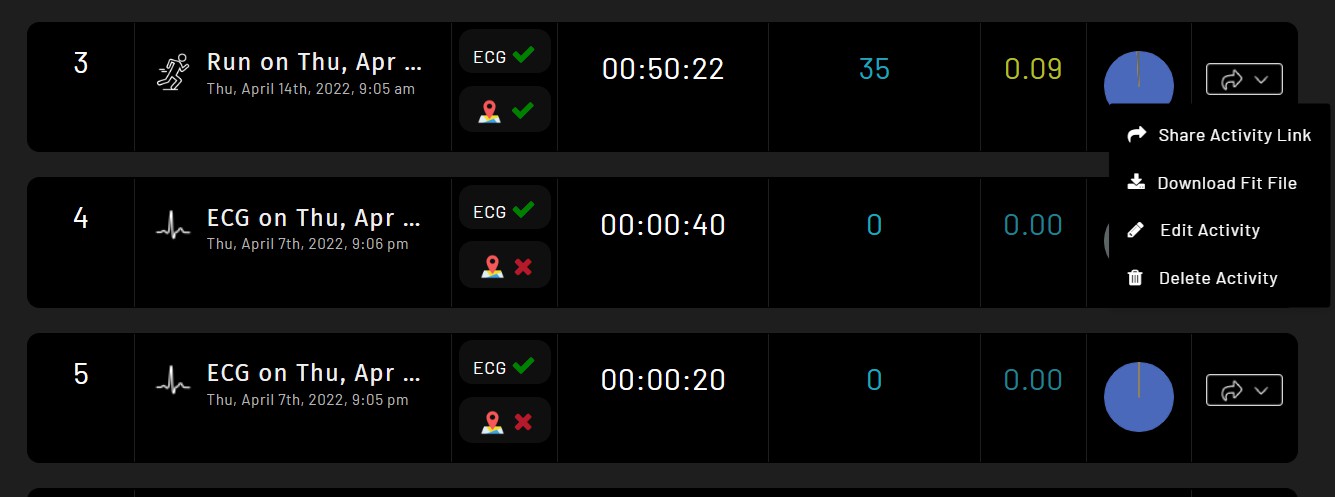
If you have carried your phone for the workout and have GPS data captured, you will able to download a FIT File which can be uploaded to TrainingPeaks. You can login to your Web Dashboard to access the FIT File. Sample screenshot attached below.
![]()
-
-
I may be missing something obvious but I can’t find information on pairing the monitor to both the iPhone app and my Garmin Venu watch at the same time. I seem to remember an update that stated this was now possible. It doesn’t seem to work for me. Please advise.
1 Comment-
![Profile picture of Fourth Frontier]()
Hi, you are right, it is possible to pair the Frontier X simultaneously with both the iPhone app as well as Garmin. You may navigate to the ‘Sensors >> Add New’ option on Garmin to pair and connect with the Frontier X. Once its connected make sure to double press the red button on the Frontier X to start receiving Heart Rate data on Garmin. You…Read More
-
-
How do I get feedback on my ecg during exercise? Just want to make sure I don’t have any abnormalities or heart rhythm issues at higher exercise intensities. I have had ecgs at rest at hospital and this has came back normal but want to make sure there are no issues when I am at higher heart rates.
1 Comment-
![Profile picture of Fourth Frontier]()
Hi, there are multiple options available to monitor your heart rate during rest as well as during activity. You have the option to set alerts to stay within a particular threshold while exercising – https://support.fourthfrontier.com/article/4-setting-your-alert-levels and the cardiac rhythm analysis feature will detect heart rhythm deviations…Read More
-
- Load More Posts



Thank you for your suggestion ! We will look into this 🙂